
Confused by the E-Rate application process? This plain language guide walks you through Form 470 and Form 471 — the two most critical steps to securing funding for your school or library.
Every year, thousands of schools and libraries leave E-Rate money on the table — not because they’re ineligible, but because the application process feels complicated. Two forms sit at the heart of that process: FCC Form 470 and FCC Form 471.
Get these two right, and you’ve cleared the biggest hurdle in the entire E-Rate program. Get them wrong — or miss a deadline — and you could lose an entire year of funding.
This guide walks you through both forms in plain language: what they are, why they matter, what happens if you miss a step, and exactly how to file them correctly.
Understanding the Big Picture First
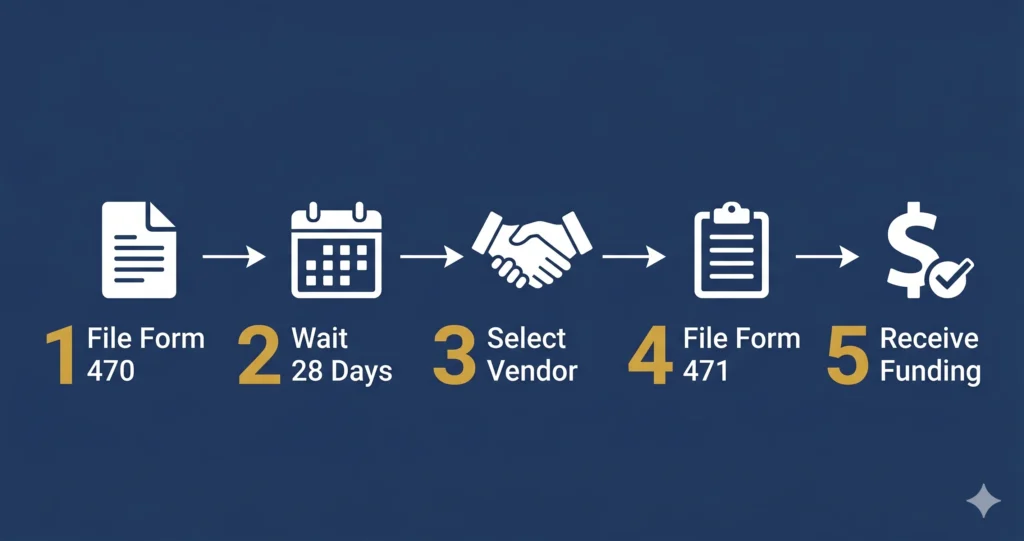
Before diving into the forms, it helps to understand the overall E-Rate application sequence:
1. File Form 470→ Launch the competitive bidding process
2. Wait 28 days → Allow vendors to submit bids
3. Evaluate bids, select a vendor, sign a contract
4. File Form 471 → Formally request your E-Rate discount
5. Wait for your FCDL → Receive your Funding Commitment Decision Letter from USAC
6. File Form 486 → Activate your funding commitment
7. Receive discounts or reimbursements via SPI or BEAR
Form 470 and Form 471 are steps 1 and 4 — and everything else flows from them.
FCC Form 470: Starting the Competitive Bidding Process
What Is Form 470?
Form 470, officially the Description of Services Requested and Certification Form, is your public announcement to the marketplace that your school or library is seeking bids for telecommunications, broadband, or internal network services.
Filing Form 470 is mandatory before you can receive E-Rate discounts. It kicks off the required competitive bidding process and puts vendors on notice that you’re in the market.
What Does It Cover?
You’ll describe the services you’re seeking — for example:
– Category 1: Internet access, fiber transport, WAN services
– Category 2: Wireless access points, managed switches, structured cabling, managed internal broadband services
You’re not committing to anything at this stage. You’re inviting bids.
Step-by-Step: How to File Form 470
Step 1 — Log into EPC
All E-Rate forms are filed through USAC’s E-Rate Productivity Center (EPC) at [usac.org](https://www.usac.org/e-rate/). If you don’t have an EPC account, create one and register your school or library entity first.
Step 2 — Update Your Entity Profile
Before filing, make sure your entity profile (school name, address, enrollment count, NSLP data) is accurate. The administrative window to update profiles typically closes about a week before the Form 471 filing window opens.
Step 3 — Create a New Form 470
Inside EPC, navigate to “FCC Forms” and select Form 470. Choose the correct funding year and service type.
Step 4 — Describe Your Services
Be specific but not overly restrictive. Overly narrow descriptions can eliminate competitive bids. If you’re open to multiple technologies (fiber vs. cable broadband, for example), say so.
Step 5 — Certify and Submit
An authorized person (typically the E-Rate coordinator or a school official) must certify and submit the form. Once submitted, it becomes publicly visible on the USAC website.
> Pro Tip: File your Form 470 as early as possible, ideally in January or early February for a spring Form 471 deadline. The later you file, the less time vendors have to submit competitive bids, and the less time you have to evaluate them properly.
The 28-Day Rule
After you certify your Form 470, you must wait a minimum of 28 days before signing any contracts or filing Form 471. This is a hard rule, no exceptions. USAC enforces it strictly, and violating it can result in your application being denied.
The last date to certify a Form 470 for FY2026 while still meeting the 28-day waiting period before the Form 471 deadline was March 4, 2026.
FCC Form 471: Requesting Your Discount
What Is Form 471?
Form 471, officially the Description of Services Ordered and Certification Form, is your actual funding request. This is where you tell USAC: “I’ve completed the bidding process, I’ve selected a vendor, and here are the services I’m requesting a discount on.”
Filing Form 471 opens the door to your funding commitment.
What You’ll Need Before You File
– Your certified Form 470 (and the 28-day waiting period must have passed)
– A signed contract or service agreement with your selected vendor
– The vendor’s SPIN (Service Provider Identification Number)
– Your school/library’s Billed Entity Number (BEN)
– Your Category 2 budget information (if filing a Category 2 request)
– CIPA certification (see below)
Step-by-Step: How to File Form 471
Step 1 — Log into EPC
Navigate to “FCC Forms” and start a new Form 471 for the correct funding year.
Step 2 — Select Your Billed Entity
Confirm the entity (school, library, or consortium) you’re filing on behalf of.
Step 3 — Add Funding Requests (FRNs)
Each service you’re requesting a discount on gets its own Funding Request Number (FRN). For each FRN, you’ll enter:
– The associated Form 470
– The service type and category
– The vendor (service provider) and their SPIN
– Contract details (contract number, start/end dates)
– Annual cost and requested discount amount
Step 4 — Certify CIPA Compliance
To receive E-Rate discounts on Category 1 internet access and all Category 2 services, your school or library must certify compliance with the Children’s Internet Protection Act (CIPA). This means you have:
– Adopted an internet safety policy
– Deployed technology protection measures (content filtering)
– Held a public hearing on your internet safety policy (for new adopters)
Schools have two additional CIPA requirements: monitoring minors’ online activity and providing cyberbullying education.
Step 5 — Certify and Submit
An authorized person must certify the form. Review everything carefully before submitting — errors discovered after submission require a USAC service request to correct.
Step 6 — Watch for Your RAL
After submission, USAC sends a Receipt Acknowledgment Letter (RAL) to you and your service provider through EPC. Review it immediately — it’s your chance to catch and correct mistakes before USAC begins its review.
> Important Note: The FY2026 Form 471 filing window ran from January 21, 2026 to April 1, 2026 at 11:59 p.m. ET. Missing the window means waiting until FY2027. Mark these dates in your calendar well in advance.
Common Mistakes to Avoid
Mistake, Why It Matters
Filing Form 471 before the 28-day waiting period ends | Automatic denial, no waiver available
Selecting a vendor not listed on your Form 470 | May result in denial during PIA review
Incorrect enrollment or NSLP data | Affects your discount percentage — can cost thousands
Missing the Form 471 filing window | Lose an entire year of funding
Not updating EPC entity profile before the admin window closes Can delay or invalidate your application |
Incomplete CIPA certification | Disqualifies your Category 1 and Category 2 requests
After You File: What Happens Next
Once your Form 471 is submitted and in USAC’s queue, here’s what to expect:
1. PIA Review: USAC’s Program Integrity Assurance team may contact you with questions. Respond promptly — delays here can push your funding decision back significantly.
2. FCDL: Your Funding Commitment Decision Letter arrives (typically in the summer/fall following the filing window). It either approves, partially approves, or denies your requests.
3. Form 486: File this within 120 days of your FCDL issue date (or service start date, whichever is later) to activate your commitment.
4. Invoicing: Work with your service provider to ensure invoices are submitted correctly via the SPI method, or file Form 472 (BEAR) for reimbursement.
Key Takeaways
Form 470 starts the competitive bidding process — file it early and be thorough
– The 28-day waiting period between Form 470 and Form 471 is non-negotiable
– Form 471 is your actual funding request have all vendor and contract details ready before you start
– CIPA compliance is required for all Category 1 internet and Category 2 funding requests
– Watch for your RAL after submission and correct errors immediately
– Missing deadlines means waiting a full year put filing windows in your calendar now
Ready to File? We Can Help.
The E-Rate application process has a lot of moving parts, but you don’t have to navigate it alone. E-Rate Compass provides plain-language guides, deadline trackers, and expert resources to help schools and libraries get every dollar they’re entitled to.
Explore our resources or contact us for a free consultation to make sure your next application is filed correctly, on time, and fully optimized.
Sources: [USAC — FY2026 Form 471 Filing Window](https://www.usac.org/e-rate-announcements/funding-year-fy-2026-fcc-form-471-application-filing-window-opens-january-21-2026/) | [E-Rate Deadlines 2026](https://erateapp.com/guides/e-rate-deadlines-2026.html) | [USAC Form 471 Filing Guide](https://www.usac.org/e-rate/applicant-process/applying-for-discounts/fcc-form-471-filing/) | [FCC CIPA Requirements](https://www.fcc.gov/consumers/guides/childrens-internet-protection-act)